Documentation
A practical guide for running and configuring Redirect Manager
Redirect Manager is created and maintained by Andrei Trukhin. For feedback, message me on LinkedIn. If you’d like to support development, you can buy me a coffee.
Docker Hub
The official Docker image is available on Docker Hub. You can pull the latest version and start using Redirect Manager immediately.
docker pull andreitrukhin/redirect-manager-api:1.0.0-beta.2Architecture Overview
Redirect Manager is built with modern technologies to ensure high performance and reliability:
- •
Runtime: Node.js 20+ with TypeScript for type safety and modern JavaScript features
- •
Framework: Express.js for robust HTTP handling and middleware support
- •
Database: PostgreSQL 15+ with Prisma ORM for reliable data persistence
- •
Authentication: JWT-based authentication for secure API access
- •
Deployment: Docker containerization for easy deployment and scaling
Request flow (redirect + proxy)
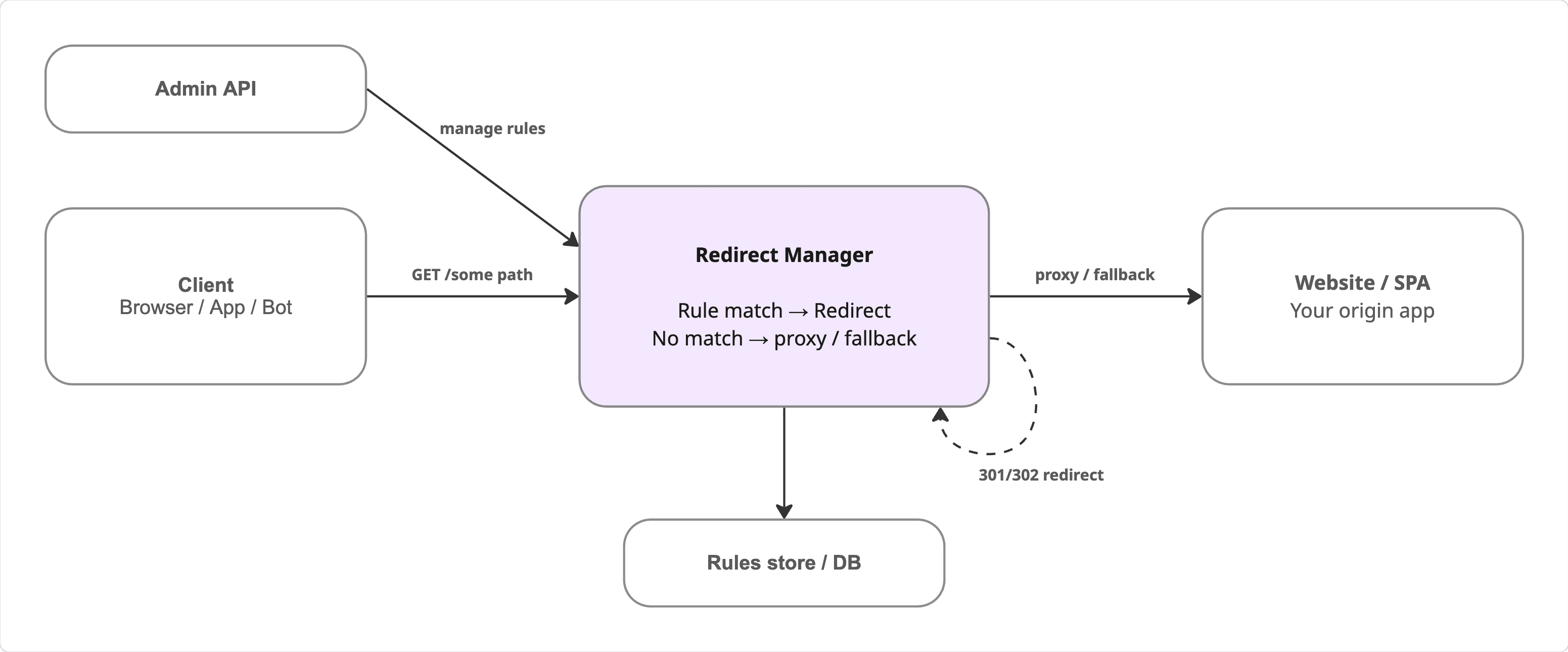
Run Redirect Manager as a small edge/proxy in front of your website. Every request hits Redirect Manager first. If a rule matches, it returns a redirect response (for example 301 or 302). If no rule matches, it can proxy/fall back to your website/SPA.
- •
Redirect path: a rule matches → Redirect Manager returns 301/302 to the client.
- •
Proxy/fallback path: no rule matches → Redirect Manager forwards the request to your website/SPA and returns the response.
- •
Management: you update redirect rules via the Admin API; rules are persisted in PostgreSQL.
Docker Compose Example
The easiest way to get started is using Docker Compose. This example includes both the Redirect Manager API and PostgreSQL database.
version: '3.8'

services:
  db:
    image: postgres:15-alpine
    environment:
      POSTGRES_USER: rm_user
      POSTGRES_PASSWORD: rm_password
      POSTGRES_DB: redirect_manager
    volumes:
      - postgres_data:/var/lib/postgresql/data

  redirect-manager:
    image: andreitrukhin/redirect-manager-api:1.0.0-beta.2
    ports:
      - "8080:8080"
    environment:
      DATABASE_URL: postgresql://rm_user:rm_password@db:5432/redirect_manager?schema=public
      JWT_SECRET: your_very_secure_random_secret_at_least_16_chars
      ADMIN_USERNAME: admin
      ADMIN_PASSWORD: admin_password
      REVERSE_PROXY_TARGET_BASE_URL: https://your-main-site.com
      API_DOCS_ENABLED: true
    depends_on:
      - db

volumes:
  postgres_data:
To start the services, save the above configuration as docker-compose.yaml and run:
docker-compose up -dEnvironment Variables
Configure Redirect Manager using the following environment variables:
| Variable | Description | Required |
|---|---|---|
| DATABASE_URL | PostgreSQL connection string | Yes |
| JWT_SECRET | Secret key for JWT token signing (min 16 chars) | Yes |
| ADMIN_USERNAME | Admin user username | Yes |
| ADMIN_PASSWORD | Admin user password | Yes |
| REVERSE_PROXY_TARGET_BASE_URL | Target URL for reverse proxy fallback | Yes |
| API_DOCS_ENABLED | Enable API documentation endpoint | No |
| PORT | Server port (default: 8080) | No |
| HOST | Server host (default: 0.0.0.0) | No |
Key Features
URL Redirect Management
Configure custom redirects with specific HTTP status codes (301, 302, etc.) through a RESTful API.
Reverse Proxy
Automatically forward unmatched requests to your target upstream server with proper header handling.
Performance Optimized
Built-in caching mechanisms and efficient database queries ensure minimal latency for your users.
Secure by Default
JWT-based authentication protects all management operations, with configurable admin credentials.
API Endpoints
Once deployed, the following endpoints are available:
- •
/api/v1/auth/token- Obtain JWT authentication token - •
/api/v1/redirects- Manage redirect rules (CRUD operations) - •
/api/v1/health- Health check endpoint - •
/api/v1/docs- Interactive API documentation (when enabled)
Quick Start Guide
1. Deploy with Docker Compose
Save the docker-compose.yaml example above and start the services:
docker-compose up -d2. Obtain Authentication Token
Make a POST request to get your JWT token:
curl -X POST http://localhost:8080/api/v1/auth/token \
  -H "Content-Type: application/json" \
  -d '{"username":"admin","password":"admin_password"}'
3. Create Your First Redirect
Use the token to create a redirect rule:
curl -X POST http://localhost:8080/api/v1/redirects \
  -H "Authorization: Bearer YOUR_TOKEN" \
  -H "Content-Type: application/json" \
  -d '{
    "source": "/old-path",
    "destination": "/new-path",
    "statusCode": 301,
    "enabled": true
  }'
Support & Feedback
Redirect Manager is a solo-developer project. If you’d like to support development, you can buy me a coffee. For feedback, message me on LinkedIn.